Couldn’t even play my PS5 for more than an hour before it would overheat and shut off. Brought it here to get cleaned and it’s been working like new ever since. Service was reasonably priced and fast (same day). Would definitely recommend
PlayStation Repair Toronto
Yonge & Eglinton · Midtown Toronto
- Warranty on all work
- Free diagnostics
- No fix, no charge
HDMI port, overheating, disc drive and power repairs for PS5 Pro, PS5, PS4 and PS3, plus DualSense controller repairs. Free diagnostics and an honest quote first.
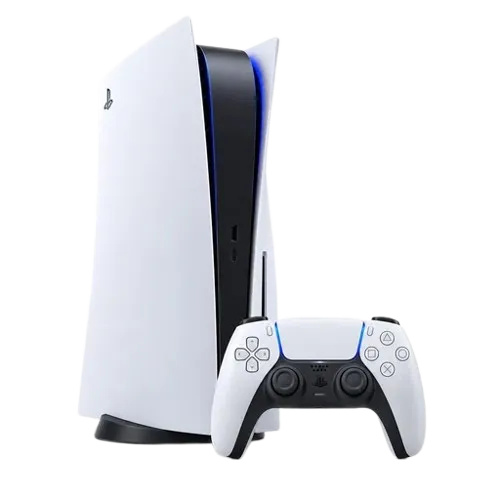
PlayStation repair services
What’s wrong
with your PlayStation?
We test your console in-store, explain the cause, and recommend the repair that makes the most sense, before any work begins.
PS5 & PS4 HDMI Port Repair
No picture, flickering or a damaged HDMI port. We replace the port and check the HDMI chip.
- no video
- bent port
Overheating & Fan Repair
Loud fan, shutdowns or overheating. Deep clean, new thermal paste or liquid metal, and fan checks.
- loud fan
- shuts off
Disc Drive & Laser Repair
Won’t read discs, ejects them or makes grinding noises. Laser and drive repaired or replaced.
- won’t read discs
- ejecting
Power & Light Issues
No power, blue light of death, beeping or white light. Diagnosed to the power supply and board.
- no power
- blue light
Hard Drive & Software Repair
Safe mode loops, error codes, corrupted data or a failing drive. See our software repair page too.
- safe mode
- error codes
Controller Repair
Stick drift, sticky buttons, adaptive triggers or charging. Ask about Hall Effect stick upgrades.
- stick drift
- not charging
What PlayStation customers
are saying.
Real reviews from PlayStation customers, taken word for word from our Google Business Profile.
Awesome shop they got new and old games whatever you are looking for they will most likely have! I got my ps5 hdmi port fixed here. Alex and his guys were professional and kept me informed and up to date on my system! I recommend going here if you have any issues with your gaming console or are looking for a specific game.
Aydin Meral5-star Google review
Alex is an expert at PS5 repairs. Friendly and professional! Had a power supply issue. Replace needed hardware and cleaned console... all done within an hour. Highly highly recommended!
Edwin Lam5-star Google review
One of the best repair stores i had a ps5 the hdmi port got chipped and it had no signal I brought it to gamearama and it is a life saver u should definitely check it out good customer service
Hamzah Mahamed5-star Google review
I highly recommend this place. Not only were Brian and Alex knowledgeable but they were transparent with me and my issues with my PS5. Bonus they have two cute dogs. I have already recommended a couple of friends with their gaming devices trouble to hear and I will for sure be back.
Thank you Brian and Alex! Much appreciated!!
Bonita Brows5-star Google review
How it works
PlayStation repair,
in four steps.
Turnaround depends on the fault and parts. We confirm the timeline with your quote.
- 01
Free diagnostic
Walk in or mail your PlayStation to us. We test it fully to find the real cause of the problem.
- 02
Clear quote
You get the price, part options and turnaround before any work starts. No surprises at pickup.
- 03
Expert repair
Parts are replaced, the console is cleaned and fresh thermal paste is applied where needed.
- 04
Tested & warrantied
We run games, discs, Wi-Fi, HDMI output and controllers for an extended test before pickup.
PlayStation overheating repair
Fan roaring?
Don’t ignore it.
Dust and dried thermal paste make your console run hot. Over time that leads to shutdowns, crashes and board damage. A professional clean now can prevent a much bigger repair later.
Do
- Keep it in an open space
- Stand it on a hard surface
- Book a clean every few years
Don’t
- Block the air vents
- Keep playing when it shuts off
- Open it if under warranty
What people
are saying.
Posted on Google 
Roland Mascarenhas
 Trustindex verifies that the original source of the review is Google.
Alex is amazing! Been fixing my iPhones for five years and always does them quickly and without problem! Recommended to friends as well.
Posted on Google
Julianne De Vincentis
Trustindex verifies that the original source of the review is Google. **UPDATE** Battery is still going STRONG - thank you!!!
Replaced the battery on my iPad Air 2 due to battery swelling - been almost a week of general usage and not being turned off, and the battery still hasn't needed to be charged. 10/10 would recommend. Super reasonable price too - much cheaper than buying a new device! Also bonus there was a beautiful dog there I got to pet :)
Posted on Google
v vn
Trustindex verifies that the original source of the review is Google. Thank you so much for fixing my 3ds
Posted on Google
Carol M.
 Trustindex verifies that the original source of the review is Google.
They did a great job on replacing the battery of my husband's console. He is very happy to be able to play his games again. Just the communication with the customer can see some improvement. I made an appointment for the battery replacement, the person told me on the phone it would take around 20 to 30 minutes to do it. But when I got there I had to leave the console and was told it would be ready later on the same day or maybe on the next day, and they would let me know when it was ready. But no one contacted me so on the 3rd day I asked about it and they said it was ready to pick up. Other than that I totally recommend this place.
Posted on Google
Moein Hasani
Trustindex verifies that the original source of the review is Google. I was there for the coffee a few times but chatted with the game sales folks and they gave me some solid guidance on buying a controller. really nice people i think i’ll start buying games from them instead of bigger retailers. i saw they had new games on release day as well.
Posted on Google
Filip Szulczewski
Trustindex verifies that the original source of the review is Google. My PS5 was overheating. I dropped it off at 3pm it was ready before 6pm. Excellent service.
Posted on Google
Russ S
Trustindex verifies that the original source of the review is Google. Game shop AND cafe!? Very interesting business, in the best possible way. Staff is very knowledgeable and friendly. The atmosphere is very inviting, and prices are better than similar places like this. Will definitely be back!
Posted on Google
LU SHERMAN
Trustindex verifies that the original source of the review is Google. Great service, reasonable prices and very nice people.
Repair your way
Three ways
to get it fixed.
Carry-in
Bring your device to our shop at 2470 Yonge St, Toronto.
Mail-in repair
Send your device to us and we’ll return it repaired.
We come to you
In-home and on-site repair across Toronto and the GTA.
Recognized & trusted
Award-winning.
Trusted by the pros.
We are excited to announce that we’ve won the Canadian Business Awards for the best cell phone repair shop in Toronto and the CBRB Best Businesses Award.







Service areas
PlayStation repair
near you.
Our store is in Midtown Toronto. We serve the whole GTA in person and the rest of Canada by mail-in.
More repairs
We fix your
other devices too.
Bring your other devices in with your PlayStation and we’ll diagnose everything in one visit.
PlayStation repair
questions
How much does PlayStation repair cost in Toronto?
Cost depends on your PlayStation model, the part needed and the part option you choose. We diagnose your device for free and give you a clear quote before any work starts. Call (416) 827-6100 or request an estimate online.
How long does PlayStation repair take?
Many HDMI port, cleaning and controller repairs are done in one to three days. Board-level and power supply repairs can take longer, depending on parts. We give you a time estimate with your quote.
Can you fix a PS5 with no picture?
Yes. No picture is usually a damaged HDMI port or HDMI chip. We test both and replace the faulty part, then check video output on a TV before you pick it up.
Will I lose my games and saves?
Most repairs don’t touch your storage. If the drive needs replacing, saves stored only on the console can be lost, so turn on PS Plus cloud saves first if you can.
Can you fix PS5 controller stick drift?
Yes. We replace worn analog sticks, and we also offer Hall Effect stick upgrades that resist drift much longer than standard sticks.
Which PlayStation models do you repair?
PS5 Pro, PS5 Slim, PS5, PS4 Pro, PS4 Slim, PS4 and PS3 consoles, the PlayStation Portal, and DualSense, DualSense Edge and DualShock controllers.
Do I need an appointment?
No. We are walk-in friendly at 2470 Yonge St, near Yonge & Eglinton in Midtown Toronto. You can also call ahead so we can check parts for your model.
Do you offer mail-in PlayStation repair?
Yes. Customers across Canada can mail their PlayStation to us. We diagnose it, send a quote, and ship it back with tracking once the repair is done. Contact us before you ship.
Do you offer a warranty on PlayStation repairs?
Yes. We stand behind every repair. Coverage depends on the repair type and the part used, and we explain it before starting the work.